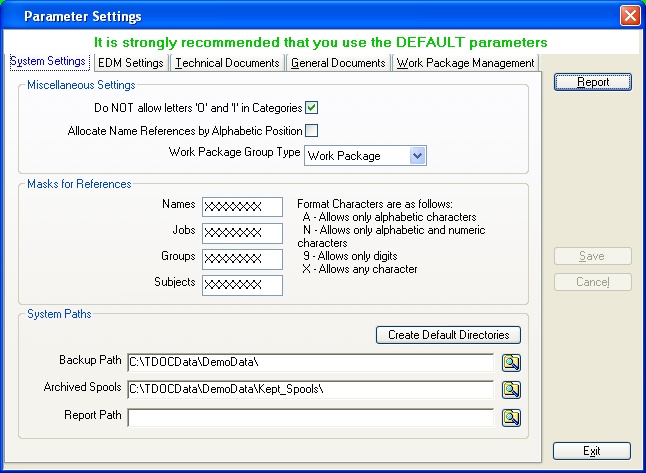
- Whether to allow the characters I and O to define a category. Although not visible, they may be utilised when defining specialised reports.
- The way automatic references are generated for Organisation Names, which should be carefully considered. There are two principal ways of doing this: first is mnemonic e.g. TPL-DC for TDOC Projects Ltd - Document Control; the second is such that they would appear in approximate alphabetic order based on a letter and three numbers e.g. T154.
- The default group type for a "Work Package". This is a mandatory entry.
A mask defining the characters which can be entered as references for Names, Jobs, Subjects and Groups. The characters allowed are:
- A which allows any Alphabetic Character
- N which allows any Alphanumeric Character
- 9 which allows any Numeric Character
- X which allows any Character
- The path used for placing back up archives (zip files) which are made. The path may also be set and or changed when a backup is created.
- The path used for archiving miscellaneous documents such as reports after they have been emailed. The path may be set or changed when moving Spool Files.
- The path to a set of reports which are to be used in preference to those defined in the user settings.
The Create Default Directories button may be used to create the two archive paths as sub-directories to the directory where the database is located.
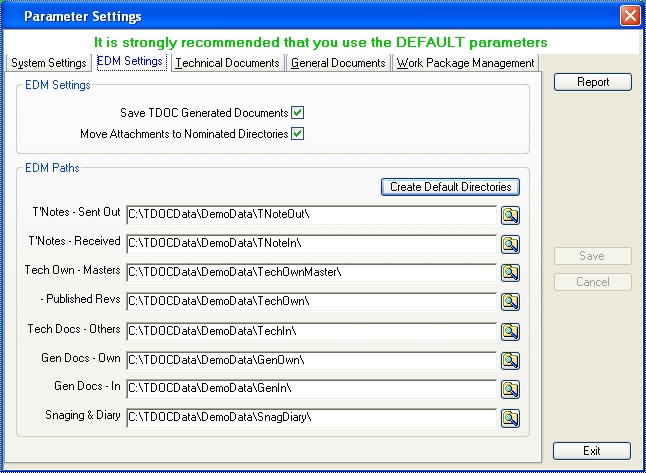
- Move Attachments to Directory. When a document is attached, then, when the associated registration information is saved, the document is moved from its current location to the appropriate nominated directory.
- Save Generated Documents. When a document is generated from within TDOC such as a Transmittal Note, or a General Document such as an RFI/TQ, then when the registration information is saved, the documents which have been created are moved from the Spool directory where they are created to the appropriate nominated directory.
The "Create Default Directories" button creates the nominated directories as sub-directories to the directory where the database is located.
Optionally, when any attachments to the record of a Technical or General document are moved, they may be renamed according to the specific rules set up within the Technical Documents and General Documents parameters - see below. There are no renaming rules for Snagging or Daily Diary entries.
Documents generated by TDOC are moved when saved or updated. A unique file naming convention is used.
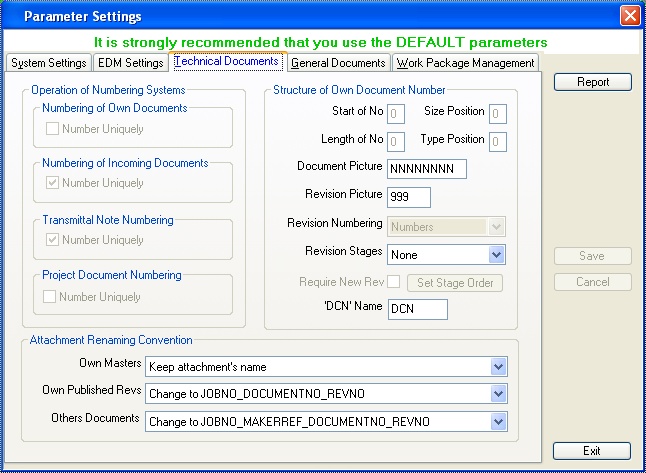
- Numbering of ones Own Documents. The default is to number "By Job" rather than uniquely across the database.
- Internal Number for Incoming Documents. The default is "Number Uniquely" across the database.
- Transmittal Note Numbers. The default is "Number Uniquely" across the database.
- Project Document Numbering. The default is to number "By Job" rather than uniquely across the database.
- To have a sequential number part, for which
- The starting position is identified
- The length of the sequential part is specified
- If required, the category code may be included for:
- The document type
- The document size.
- The characters which are allowed can be specified. See References for System Parameters.
The revision sequence may be specified as follows:
- The revision sequence from one of the following
options:
- Letters only
- Letters then Numbers. This should NOT be used unless absolutely necessary, as in order for the database to function correctly, data has to be transformed.
- Numeric revisions only
- Numbers and then Letters
- The characters which are allowed can be specified.
- If Stages are in use, then a New Revision can be forced when the Stage is changed
Revision Stages may also be managed as follows:
- None
- Optional
- Mandatory, in which case a change of revision may be forced.
- In Revision: viz the stage codes are used as the first character of the revision. The order of stage codes must be setup using the Set Stage Order button.
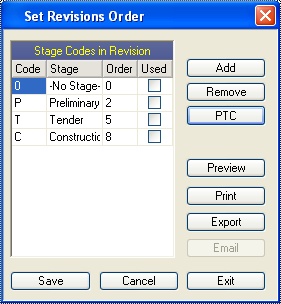
Please note:
- The Add button adds a blank code. A valid Stage code must be entered, and then the order must be entered. The Stage is indicated.
- The Order is ASCII namely from 0 to 9 to A to Z.
- Codes which have been used may not be removed or changed.
- The PTC button adds the default Stages as shown.
- If the attached document is already in one of the nominated EDM directories, nothing is done, viz it is nether moved or renamed, otherwise,
- The document is moved and renamed according to the
selected renaming rule, retaining the same extension. The available
rules are:
- Masters of ones Own Documents
- "Keep attachments name" - the attachment is moved only.
- "Change to JOBNO_DOCUMENTNO__Master" - the attachment is moved and renamed.
- Revision of ones Own Documents
- "Keep attachments name" - the attachment is moved only.
- "Change to JOBNO_DOCUMENTNO_REVNO" - the
attachment is moved and renamed as follows:
- Published Revision: JOBNO_DOCUMENTNO_REVNO
- Returned Revision: JOBNO_DOCUMENTNO_REVNO_Ret_NAMEREF (of the returner)
- Others Documents
- "Keep attachments name" - the attachment is moved only.
- "Change to JOBNO_MAKERREF_DOCUMENTNO_REVNO"
- the attachment is moved and renamed as follows:
- Received Revision: JOBNO_MAKERREF_DOCUMENTNO_REVNO
- Returned Revision: JOBNO_MAKERREF_DOCUMENTNO_REVNO_Ret_NAMEREF (of the returner)
- "Change to JOBNO_ICNO" - the attachment is
moved and renamed as follows:
- Received revision: JOBNO_ICNO (where ICNO is the automatically allocated incoming no)
- Returned Document: JOBNO_ICNO_Ret_NAMEREF (of the returner)
- Masters of ones Own Documents
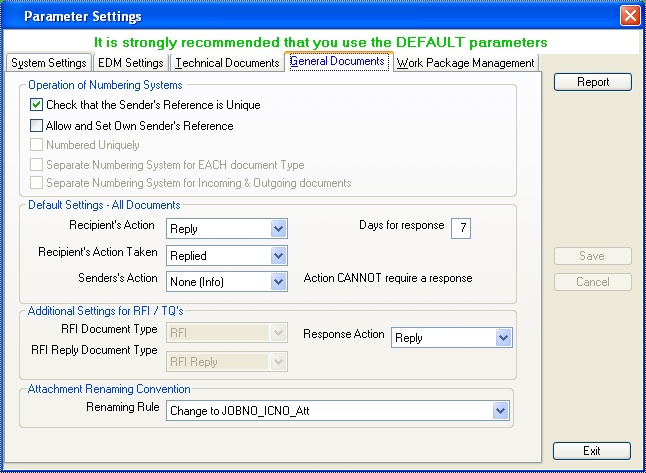
- The 25 character Originator's reference:
- Allow the recording of more than one document with the same Sender's Reference
- Allow the editing of the Originators reference when generating ones Own documents
- The way in which the 8 character Internal Reference
(which is also used by default for the originators reference for ones
own documents) is generated is controlled as follows:
- Generate the number uniquely across the database, rather than a set of numbers for each JobNo,
- Generate a separate series of numbers for each type of document, i.e. include the document type category code within the reference,
- Generate a separate series of numbers for incoming and outgoing documents, i.e. include the letters "I" or "O" within the reference.
- the purpose it was sent out, which will include if a response is expected, and if so
- then the number of days within which the response is required,
- the default action that is expected for the response, and
- the default purpose for which a copy is sent to the originator if it is an own document. This purpose cannot have a response action required. The need for a purpose is to put it into the originators mail box.
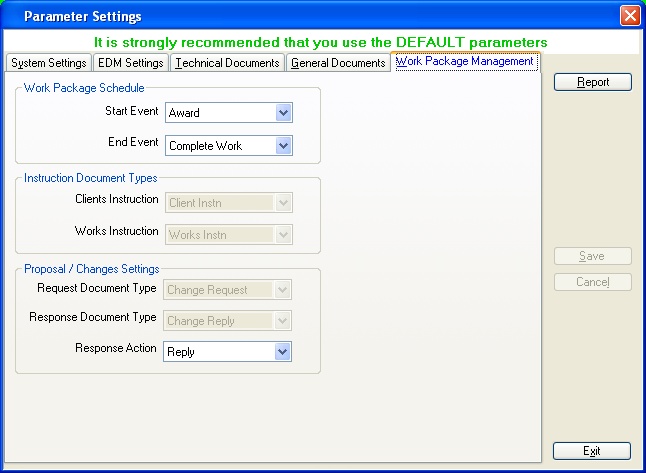
- The default response action which MUST include the requirement to make a reply,
- The document type for raising an RFI,
- The document type for making a response to an RFI,
- If the attached document is already in one of the nominated EDM directories, nothing is done, viz it is nether moved or renamed, otherwise,
- The attachment is renamed according to the selected
renaming rule, retaining the same extension. The available rules are:
- "Keep attachments name" - the attachment is moved only.
- "Change to JOBNO_SENDERREF_SENDERDOCREF_Att" - the attachment is moved and renamed
- "Change to JOBNO_ICNO_Att" - the attachment is moved and renamed