
Upgrading Joomla 6, and development of TDOC stuff in Joomla 6
- 14th October 2026. Upgraded to 6.2.0. All is Ok. Upgraded JCE to 3.0.1. Grids do not display properly in editor. Manual upgrade required. Sigplus requires a manual upgrade to 1.5.2.304
- 4th October 2026. Testing of UMAP on Open Street Map completed. The TDOC GMAP extension will be withdrawn when Google Maps support for kml ceases.
- 30th September 2026. Upgraded to 6.1.4. All is Ok.
- 27th September 2026. Upgraded JCE to 3.0.1. Grids do not display properly in editor. Manual upgrade required.
- 19th August 2026. Upgraded to 6.1.3. All is Ok.
- 19th July 2026. Upgraded to 6.1.2. All is NOW Ok. Restored the two hacked sites after upgrading to 6.1.2 locally, repaired one site Ok.
To read the whole saga is click here. - 18th June 2026 HACKED. UnaccountableScotland.org.uk and AccountabilityScotland.org.uk in particular.
- 27th May 2026: Upgraded to 6.1.1. All is Ok.
- 22nd April 2026: Upgraded to 6.1.0. All is Ok.
- 21st April 2026: Upgraded to 6.0.3. All is Ok. The Favicon shambles continues. The ..\media\system\images directory is not "safe" from being updated. The two TDOC addons are fine but require their update xml's to be updated on the "to do" list.
- 20th February 2026: Upgraded to 6.0.3. All is Ok. However the Cassiopeia's icons are not displaying as they did prior to upgrade on the two sites upgraded, but they do still appear on mobiles and some other browsers. There is still nowhere obvious to upload fabicon.ico's, so a manual upload via the web host's control panel is required. . . . shambles.17th January 2026: Upgraded to 6.0.2. All is Ok.
- 29th November 2025: Upgraded to 6.0.1. All is Ok. Noted that JCE 2.9.96 has to re-installed.
- 16th October 2025: Upgraded to 5.4.0, and then to 6.0.0. All is Ok. Noted that Articles Anywhere needs the tag to determine what content is shown, viz the Linn Park Nature Trail Book. Noted Linn Park site had a problem. Restored from 5.3.4. See Migrating to J6.
- 1st October 2025: Upgraded to 5.3.4. All is Ok.
- 20th August 2025: Upgraded to 5.3.3. All is Ok.
- 9th July 2025: Upgraded to 5.3.2. All is Ok.
- 28th May 2025: Upgraded to 5.3.1. All is Ok.
- 16th April 2025: Upgraded to 5.3.0. All is Ok.
- 9th April 2025: Upgraded to 5.2.6. All is Ok. The upgrade of JCE from 2.9.83 to 2.9.84 requires that JCE is re-installed.
- 12th March 2025: Upgraded to 5.2.5. All is Ok. The upgrade of JCE from 2.9.82 to 2.9.83 requires that JCE is downloaded installed.
- 19th February 2025: Upgraded to 5.2.4. All is Ok.
- 8th January 2025: Upgraded to 5.2.3. All is Ok.
- 27 November 24: to upgrade JCE from 2.9.81 to 2.9.82 - requires that JCE is removed and reinstalled.
- 8th November 2024 - Upgraded to 5.2.1. All is Ok.
- 16th October 2024 - Upgraded to 5.2.0. All is Ok.
However, when upgrading JCE, the upgrade zip file fails to open. And occasionally there appear to be two identical instances of JCE to be upgraded - which requires two reinstallations. - 10th July 2024 - Upgraded to 5.1.2. All is Ok.
- 20th May 2024 - GMAP module upgrade to Joomla 5 first version finished - with thanks to RobbieJ ! [Busy - see PropertyRegulation.org.uk]
- 3rd May 2024 - Facebook module upgrade to Joomla 5 finished - with thanks to RobbieJ !
Installed on this web site, and ParkDavidson.co.uk - and both sites working well. - 22nd April 2024 - Upgraded to 5.1.0. All is Ok.
Note: The Joomla Plugin called "CAPTCHA - Invisible reCAPTCHA" needs to be removed in older sites. Dated 1st Nov 2017. - 21st February 2024 - Upgraded to 5.0.3. All is Ok.
- 10th January 2024 - Upgraded to 5.0.2. All is Ok.
- 29th November 2023 - Upgraded to 5.0.1. All is Ok.
- 21st October 2023 - Upgrade to 5.0.0. Both TDOC extensions passed inspection and working Ok.
- 18th October 2023 - Upgraded to 4.4.0. All is Ok.
- 24th August 2023 - Upgraded to 4.3.4. All is Ok. Still a few bugs around:
- If one clicks the "checking extensions" whilst the check is in progress, and then do something else, and go "System", then it shows that there are no extension updates - even when knows that there are some.
- Had a strange one with JCE going from 2.39 to to 2.41 showed there were two upgrades. If one selected to upgrade both, then the upgrade is perforned followed by a "Whoops 500" - presumably when it fails to upgrade that which has been upgraded.
- 17th August 2023 - Upgraded a while ago to 4.3.2, and then 4.3.3. On 11th August upgraded Articles Anywhere, and Tabs & Accordions. This knocked out Sigplus on Linnpark.org.uk for some reason. Restored and having tested locally successfully tried again and all went well.
- 4th May 2023 - Upgrade from 4.3.0 to 4.3.1. Everything working a treat ! Fixed XAMPP.
- Wednesday 15th March 2023. Upgraded all sites to 4.2.9. Everything working a treat ! Suddenly XAMPP started playing up after three months for what reason I cannot fathom.
- Friday 17th February 2023. Upgraded all sites to 4.2.8. Everything working a treat !
- Wednesday 1st February 2023. Upgraded all sites to 4.2.7. Everything working a treat !
- Sunday 8th January 2023. Finally the Accountability Scotland overhaul has been completed, and all is Ok. Community Builder proved to be the culprit of causing crashes - but is now fixed - see clean up for details. Chrome has fixed the Authority Bug for Facebook. The only current problem is enabling an http: call to an https: site for updating the two TDOC extensions.
- Wednesday 14th December 2022. Version 4.2.6 arrived. The two TDOC extensions work perfectly. Noted that Google Chrome is no longer updated for Windows 7, and the "authority" bug for the Facebook display module has NOT been fixed. Local Development has been moved to Windows 11 Pro - which actually is not much faster than Windows 7 Pro SP1 - but is NOT easy to configure.
- Wednesday 9th November 2022. Version 4.25 arrived. The two TDOC extensions work perfectly.Saturday 3rd September 2022. Version 4.2.2 arrived. The two TDOC extensions work perfectly.
- Wednesday 31st August 2022. Finally 4.2.1 is released. The two TDOC extensions work perfectly, as does the Breadcrumbs Advanced from UWIX - tho that fails it's J4 checks ...
- Wednesday 25th May. Update to 4.1.3, and 3.10.9 for sites awaiting extensions. The two TDOC extensions work perfectly.
- Wednesday 11th May. Update to 4.1.3, and 3.10.9 for sites awaiting extensions. The two TDOC extensions work perfectly.
- Sunday 10th April. The two TDOC extensions have been renamed, and approved. Updated both JED pages.
- Thursday 31st March. Updated to 4.1.2 .... ah ummm via 4.1.1 RC2... tdocgmap and tdocfbk working fine.
- Wednesday 16th March 2022. Completed translations of mod_tdocfbk, and tdocgmap extensions. Requested JED Support to rename extensions as follows [links to Tickets shown]:
- mod_tdocfbk to TDOC Facebook Display. Previously mod_tdoc_fbk had been rejected as a name ! LISTING-TB7UY2VC5Z
- tdocgmap to TDOC Google Maps KML Display. tdocgmap was accepted as a name. LISTING-BGL8SJIBYH
- Here are the revised png's for JED:


- Saturday 19th February 2022. Found a bug in Joomla's Breadcrumbs. Fixed by changing to Breadcrumbs Advanced from www.uwix.nl.
- Tuesday 15th February 2022. Upgraded to 4.1.0. The two TDOC extensions work as expected.
It is necessary to remove Search Extension Pkg 4.0.1-dev as 4.1.0 does not like it [Nor do I]. - Tuesday 18th January 2022. Upgraded to 4.0.6. Sorted grids for showing images with titles and descriptions. See Progress Rport for the details of the html and css required.
- Wednesday 5th January 2022. Over Christmas & New Year, sorted out out the use of Grids to replace Tables. WP and RGTR done. But the best news is that Akeeba's FOF-4x is no longer needed. End of "fiffing and faffing" !
- Thursday 16th December 2021. Upgraded to Joomla The currently installed Joomla! version is "4.0.5-rc1"
- Sunday 12th December 2021. Upgraded to Joomla The currently installed Joomla! version is "4.0.5-rc1"
- Monday 26th October 2021. Manual upgrade from 4.0.4-RC1 to 4.0.4 - auto not working ???
- Monday, 18th October 2021. Upgraded to Joomla 4.0.4 Release Candidate 1.
- Wednedsay, 25th August. Upgraded to 4.0.2.
- Tuesday, 17th August. Upgraded to Joomla 4.0.0 The two TDOC extensions work as expected.
- Saturday 14th August 2021. Upgraded Akeeba Backup 8 to Akeeba Backup for Joomla 9. Notes below.
- Friday, 13 August 2021. Upgraded to Joomla 4.0.0 Release Candidate 6.
- Looking good. First site moved to J4 - fine - now configuing Cassiopeia !
-
Thursday 26th August 2021. Couple of problems as follows:
These now seem to be fixed.
Previously, In the upgrade xml file this tag is used: <targetplatform name="joomla" version=".*"/>. This is as shown in the article about Joomla Upgrade mechanism. It seems not to work - throws "upgrade needed" messages ! Also updated the Minimum PHP to 7.3 in both updaters. All seems sorted
This is about configuration - and what suits me.
Started with a blank J 400.
Added Akeeba, and Admin Tools. Backup 1a
Sorted out settings:
- Sticky Header,
- Back to Top Link - ON
- Password: 09 Chars
- 500 items to display in lists
- No login to site.
- Session 120 minutes
- Index, Follow [since this is the TDOC stuff support site !]
Added this article to Menu
Added JCE, set JCE to editor, amended JCE toolbar. Backup 2b
Added Sigplus, configured sigplus. Created sigplus article - shows JCE config. Backup 2c
Added Facebook Display module - rewritten from the now deprecated "mod_custom_facebook_display". Backup 3a
24 March 2021 - Restored after Akeeba update crash. Had copied all articles into Notepad ex Code.
Improved Facebook Display - removed unnecessary code.
10 April 2021
Finished the Google Map display with KML files only. Backup 4b
Some more tweaking continues - but not worth mentioning. Development Project closed.
The specification for placing a module and or a plugin in the JED [Joomla Extensions Directory] is a shambles. It might even be said to have gone "political".
Installed RC4, and thanks to the Joomla Forum - sorted nested menu items in Cassiopeaia.
Installed RC5, and now on Friday 13th RC6
Backup 6k. 13 Aug 2021 - all going well.
Backup 0a_J4Test_Live_4.0.2_20210825_083615 - my new naming convention. Seems [Random] is added whether specified or not.
Notes on the Akeeba Backup for Joomla [viz ver 9] upgrade and cleanup process.
The process is a little unclear .... so having upgraded to rc6:
- Made a backup using Akeeba Bakup 8.09. Downloaded and restored using Kickstart 7.06. Tested and all ok.
- Read the instructions. Always a good idea. Do NOT uninstall Akeeba Backup 8 - it is needed to export one's settings to Akeeba Backup for Joomla 9.
- Noted the new name for Akeeba Backup - it is now "Akeeba Backup for Joomla"
- Downloaded Akeeba Backup for Joomla and installed by upload. I find this is always safer when "changes are about".
- Migrated the settings.
- Made a backup using Akeeba Backup for Joomla 9.02 Downloaded and restored using Kickstart 7.06. Tested and all ok.
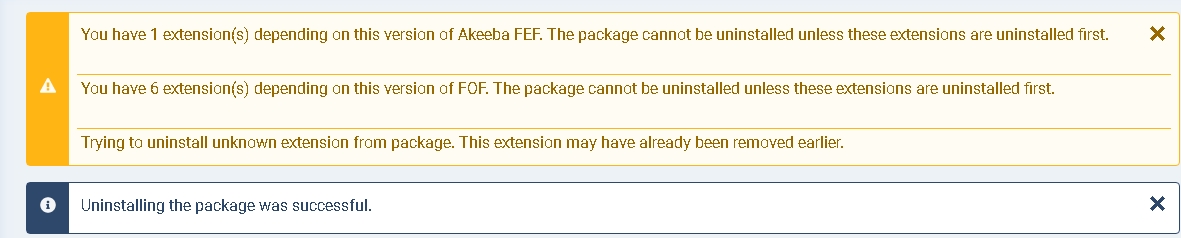
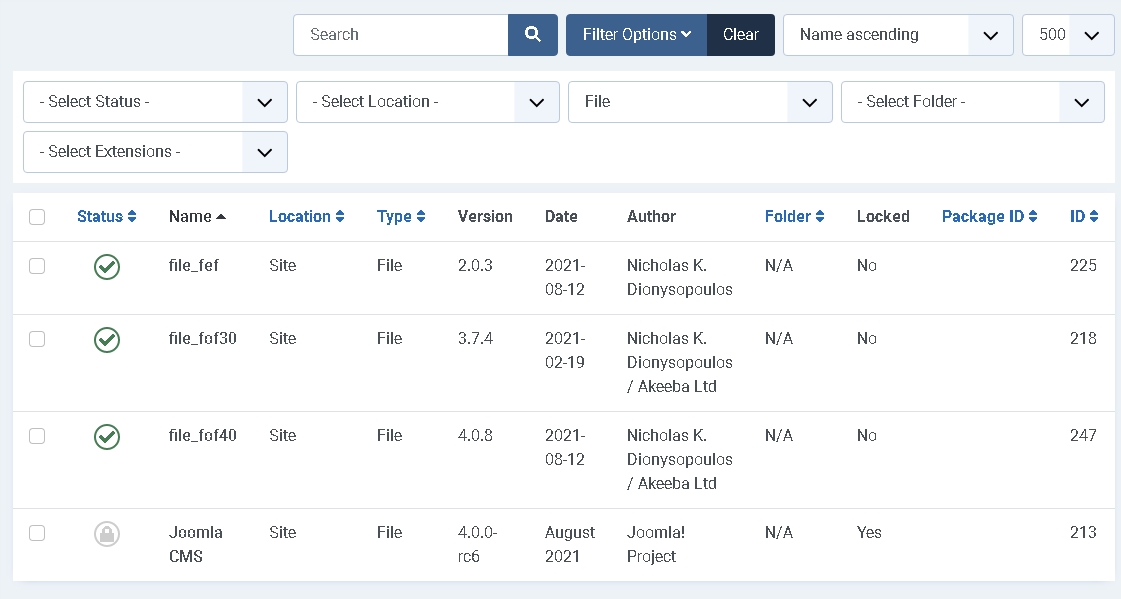
- Next is to uninstall Akeeba Backup 8.0.9. This is all about "fiffing and faffing." Selected all the Akeeba 8 stuff, and used the Uninstall button, to be met with a Whoops screen. Ouch.
- Closed the window and restarted - login was not affected.
- Selected ONLY Akeeba Backup 8.0.9 for uninstallation. Used the Uninstall button. All worked ok. See the two pictures below which to me seem to explain everything.
- Made a final backup !
Don't forget to upgrade Akeeba Tools .... coming soon one might presume !