
Background
I have been using XAMPP for many years both on my own network server [now retired] and my local pc [old W7 and new W11].
It turns out my problem is probably due an interreaction between HP's Wolf Security and XAMPP
Joomla reports that the XAMPP build being used is Apache/2.4.54 (Win64) OpenSSL/1.1.1p PHP/8.1.12 and all works fine, Control Panel 3.3.0 . . . for now [thats 18th October 2023] ! And on 21st Oct 2023, having removed all traces of XAMPP, used CCleaner, and reinstalled am now using Apache/2.4.56 (Win64) OpenSSL/1.1.1t PHP/8.2.4.
There does appear to be a later version !
The Problem when running XAMPP 3.3.0 on Windows 11 Pro
Suddenly the SQL server shuts down.
This can occur both when starting mySQL from the XAMPP control panel, or on some occasions whilst in the midst of just using Joomla or Akeeba's Kickstart.
One thing is for sure, it is most unsettling. Especially when one has a new pc with:
- Processor: 12th Gen Intel(R) Core(TM) i9-12900
- RAM: 32.0 GB (31.7 GB usable)
- A gig of solid state storage.
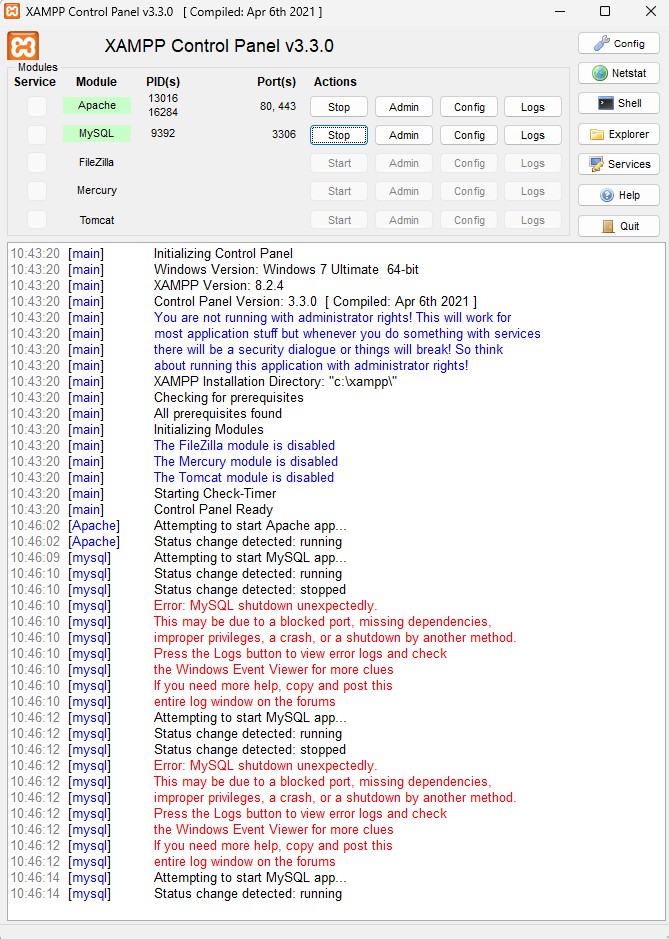 The error message is as follows:
Error: MySQL shutdown unexpectedly.
This may be due to a blocked port, missing dependencies, improper privileges, a crash, or a shutdown by another method. Check the "/xampp/apache/logs/error. log" file and the Windows Event Viewer for more clues.
No clues to me at all. Also persistence pays off - ignore and restart MySQL - and guess what third time lucky !
See left for a screen shot !
This seems to quite a common problem - judging by the number of videos on uTube.
The fix
This uTube video is quite good ... just a series of instructions on screen. These are listed below.
https://www.youtube.com/watch?v=Qy7c90nlYGI
Run xampp-control.exe as Administrator - in fact reinstall and set the "Run as Administrator" property and all is OK - mostly !
Launch using Explorer
Select mysql folder
Rename folder data to "data_old"
Create new folder "data"
Go to folder "backup"
Copy complete content.
Paste into the folder "data"
Go to folder "data_old"
Copy "database folders" + "test folder" + "ibdata1"
Paste into the folder "data" - NOTE: say YES to replace any duplicate files
However, although this gets things going again, there is one thing to note:
- When using phpMyAdmin, to drop any of your databases because for example these were Akeeba Backups which have been superseded , then you need to remove the content of backup directories [.frm and .ibd files] before you can remove the database.
Other suggested fixes
https://softwarekeep.com/help-center/how-to-solve-error-mysql-shutdown-unexpectedly
Method 1. Run XAMPP as Administrator
Method 2. Restore Your MySQL Backup Folder [see above]
Method 3. Repair the MySQL Database With Shell Commands - which did not work for me.
Method 4. Stop the MySQL Service - which did not work for me
Method 5. Change Your Client and Server Ports - makes no difference.
From the XAMPP control panel, use the mySQL config button to open "my.ini".
Then change the two port defines from "port=3306" to "port=4000".
Causes
This of course is what one needs to know before getting a long term fix sorted out.
It appears to me the main cause is one of permissions . . . about which Windows 11 seems to be more than marginally bananas, and the conflict with HP Wolf Security.
Remedial Actions taken
So what have I done is:
- Run the XAMPP control panel as "administrator" as opposed to me [who is an administrator in any event]
- Upgrade / Update Reconfigure [automnatic] HP Wolf Security . . . and all working on 18th October 2023 !